Built for complex hardware workflows

Built for complex hardware workflows

Hardware teams use Tandem to manage requirements, review and verify designs, and answer “How did we get here?” It connects CAD revisions, requirements, and the decisions behind the design in one traceable record.
Tandem platform interface

Your process becomes the system

Tandem sits across the workflows where hardware teams usually lose context: requirements, CAD, design reviews, documents, conversations, and downstream evidence. 


Tandem can start as a platform or be deployed around the way your company builds hardware, turning existing workflows into one operating layer for engineering intelligence and AI automation.
  • Define

    Define

    Team member photo

    Design

    Design

    Team member photo

    Review

    Review

    Team member photo

    Release

    Release

    Team member photo

Inside Tandem

Use each module on its own, or connect them to follow a design change from the requirement it affects to the revision you release.

System Architecture

Requirements Management

Tandem Watch

Design Reviews

Product Data Management (PDM)

AI Assist & Automations

See how your product fits together.

Map systems, parts, and the interfaces between them. Open a subsystem to see its owner, requirements, and engineering attributes, from mass pulled from CAD to cost linked from a spreadsheet. Explore a change on a branch, compare it with the original design, and merge it when ready.

Cabin ventilation system tree with a low-noise blower branch and linked recirculation attributes, requirement, and test file.

[01]

System Architecture

See how your product fits together.

Map systems, parts, and the interfaces between them. Open a subsystem to see its owner, requirements, and engineering attributes, from mass pulled from CAD to cost linked from a spreadsheet. Explore a change on a branch, compare it with the original design, and merge it when ready.

Cabin ventilation system tree with a low-noise blower branch and linked recirculation attributes, requirement, and test file.

System Architecture

Requirements Management

Tandem Watch

Design Reviews

Product Data Management (PDM)

AI Assist & Automations

[01]

Map systems, parts, and the interfaces between them. Open a subsystem to see its owner, requirements, and engineering attributes, from mass pulled from CAD to cost linked from a spreadsheet. Explore a change on a branch, compare it with the original design, and merge it when ready.

Tandem platform screenshot
Cabin ventilation system tree with a low-noise blower branch and linked recirculation attributes, requirement, and test file.

[02]

Requirements Management

Manage requirements from definition through verification.

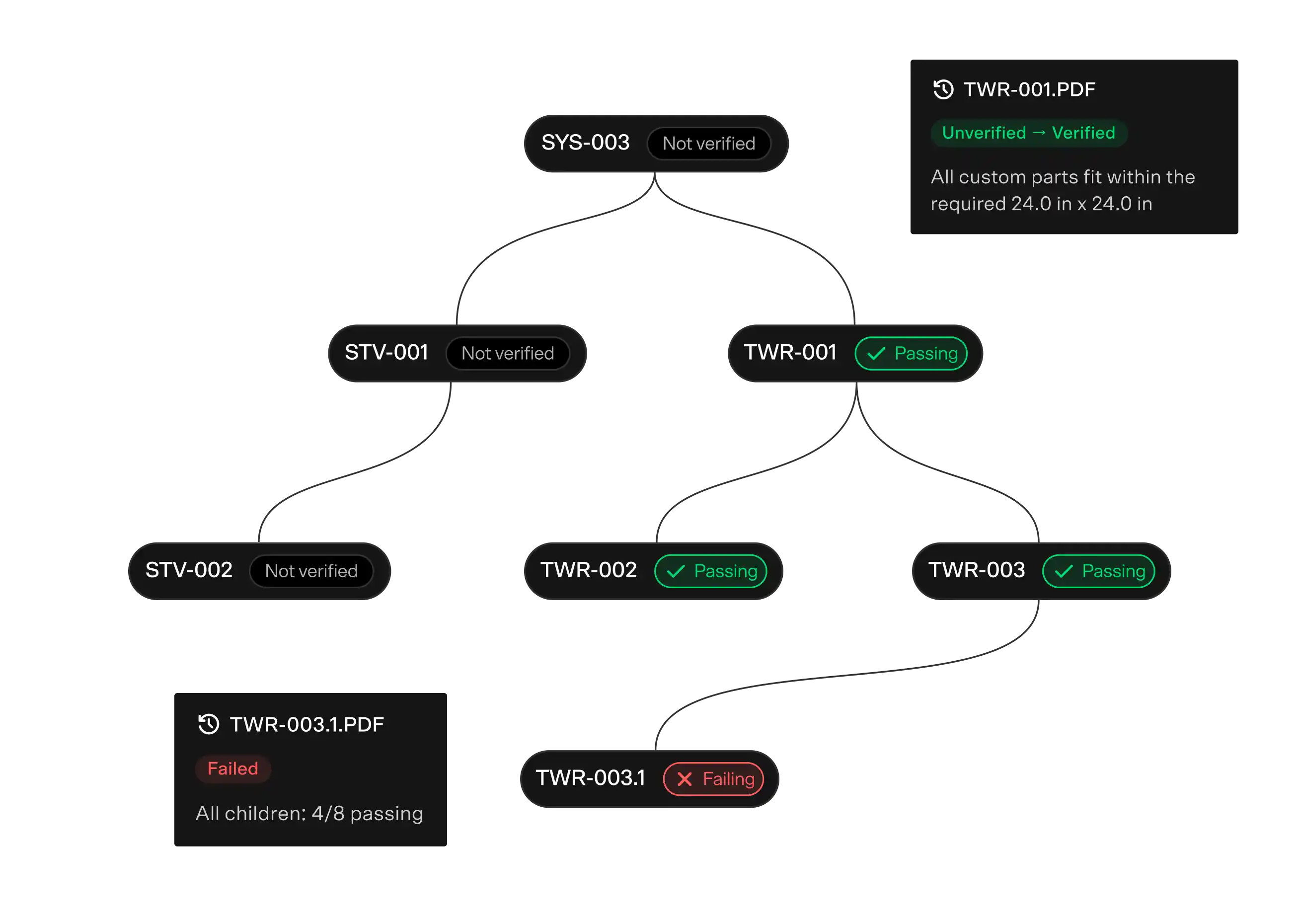
Organize requirements, risks, and defects as item types. Build parent–child hierarchies and trace which requirement mitigates a risk or which test verifies it. Baseline requirements, route revisions for approval, and link test results. Ask Tandem where links or verification evidence are missing.

Tandem platform view

[03]

Tandem Watch

Capture design changes as you work.

Turn on Watch inside your CAD tool. As you edit, Tandem captures changes from the feature tree, groups related edits, and drafts a summary. Add why you made the change so the next engineer can follow the decision.

Tandem platform view

[04]

Design Reviews

Review a 3D model together.

Engineers and suppliers can follow the same view, pin comments to a feature, and revisit the discussion after the design changes. Run a first pass for manufacturability, or configure AI reviews around your team’s design guidelines and recurring feedback.

Tandem platform view

[05]

Product Data Management (PDM)

Know which revision to build.

Check parts and assemblies in and out. Find a part by number, start a new design from an earlier version, and see which version an assembly uses. Release the approved revision for manufacturing.

A checked-out blower mount at C6 and the checked-in C7 version with slotted mounting holes.

[06]

AI Assist & Automations

AI Assist & Automations

Tandem connects CAD revisions, requirements, test results, and review feedback in a knowledge graph. It can use a supplier’s past feedback to flag a recurring manufacturing issue, trace a part change to the tests your team should rerun, or draft a change order from the decisions behind it. Tandem can also generate editable drawings with GD&T from CAD.

Tandem platform view

One program, five perspectives

[01]

Mechanical engineers

Check in the new part version, record why it changed, and see the feedback pinned to the model.

[01]

Mechanical engineers

Check in the new part version, record why it changed, and see the feedback pinned to the model.

[01]

Mechanical engineers

Check in the new part version, record why it changed, and see the feedback pinned to the model.

[02]

Systems engineers

Trace the change to the subsystems, interfaces, and requirements it affects.

[02]

Systems engineers

Trace the change to the subsystems, interfaces, and requirements it affects.

[02]

Systems engineers

Trace the change to the subsystems, interfaces, and requirements it affects.

[03]

Quality & regulatory

Open a requirement and see its verification history, the measured value, and the evidence behind the result.

[03]

Quality & regulatory

Open a requirement and see its verification history, the measured value, and the evidence behind the result.

[03]

Quality & regulatory

Open a requirement and see its verification history, the measured value, and the evidence behind the result.

[04]

Manufacturing & suppliers

Look up the released revision and the parts its assembly calls for before starting a build.

[04]

Manufacturing & suppliers

Look up the released revision and the parts its assembly calls for before starting a build.

[05]

Engineering leaders

See which findings are still open, which changes need approval, and who owns the next decision.

[05]

Engineering leaders

See which findings are still open, which changes need approval, and who owns the next decision.

[04]

Manufacturing & suppliers

Look up the released revision and the parts its assembly calls for before starting a build.

[05]

Engineering leaders

See which findings are still open, which changes need approval, and who owns the next decision.

Plugs into your existing tech stack

Plugs into your existing tech stack

PLM

Solidworks

Teams

Fusion

Fusion

Onshape

Slack

Google Workspace

Engineering Artifacts

Excel

Email

NX CAD

Custom Integrations

Requirement Docs

Excel

Plugs into your existing tech stack

Solidworks

PLM

Teams

Fusion

Onshape

Slack

Engineering Artifacts

Google Workspace

Email

NX CAD

Excel

Requirement Docs

Custom Integrations

Tandem platform screenshot

Enterprise-grade security

Tandem is built for teams working with sensitive CAD, requirements, supplier data, and regulated programs. Deploy in cloud, private cloud, or self-hosted environments. Set program roles to control who can view, edit, or manage the work, including external collaborators.

Tandem platform screenshot

For industries where every design change matters

Aerospace
Space
Medical Devices
Robotics & Industrial
Consumer Tech
Maritime
Automotive
Heavy Machinery
[01]
Aerospace
[02]
Space
[03]
Medical Devices
[04]
Robotics & Industrial
[05]
Consumer Tech
[06]
Maritime
[07]
Automotive
[08]
Heavy Machinery

[01]

Aerospace

[02]

Space

[03]

Medical Devices

[04]

Robotics & Industrial

[05]

Consumer Tech

[06]

Maritime

[07]

Automotive

[08]

Heavy Machinery

[01]

Aerospace

[02]

Space

[03]

Medical Devices

[04]

Robotics & Industrial

[05]

Consumer Tech

[06]

Maritime

[07]

Automotive

[08]

Heavy Machinery

[01]

Aerospace

[02]

Space

[03]

Medical Devices

[04]

Robotics & Industrial

[05]

Consumer Tech

[06]

Maritime

[07]

Automotive

[08]

Heavy Machinery

Build better
hardware, faster

Tandem gives hardware teams a shared system for design intent, CAD changes, requirements, validation evidence, and release documentation.

Build better
hardware, faster

Build better
hardware, faster

Tandem gives hardware teams a shared system for design intent, CAD changes, requirements, validation evidence, and release documentation.

Build

Build better
hardware, faster

Tandem gives hardware teams a shared system for design intent, CAD changes, requirements, validation evidence, and release documentation.

>